If you are mostly hosting files, open media vault has minimal command line, and it's mostly administered through a web admin. It's still fairly complex however, and I definitely recommend reading the manual thoroughly and sticking with easy tasks at first. https://www.openmediavault.org/
this post was submitted on 28 Apr 2025
86 points (88.4% liked)
Selfhosted
54217 readers
661 users here now
A place to share alternatives to popular online services that can be self-hosted without giving up privacy or locking you into a service you don't control.
Rules:
-
Be civil: we're here to support and learn from one another. Insults won't be tolerated. Flame wars are frowned upon.
-
No spam posting.
-
Posts have to be centered around self-hosting. There are other communities for discussing hardware or home computing. If it's not obvious why your post topic revolves around selfhosting, please include details to make it clear.
-
Don't duplicate the full text of your blog or github here. Just post the link for folks to click.
-
Submission headline should match the article title (don’t cherry-pick information from the title to fit your agenda).
-
No trolling.
-
No low-effort posts. This is subjective and will largely be determined by the community member reports.
Resources:
- selfh.st Newsletter and index of selfhosted software and apps
- awesome-selfhosted software
- awesome-sysadmin resources
- Self-Hosted Podcast from Jupiter Broadcasting
Any issues on the community? Report it using the report flag.
Questions? DM the mods!
founded 2 years ago
MODERATORS
yunohost
Just from the handful of OSs I've tried, I'd suggest Ubuntu desktop again.
As for docker, I'd say to get docker and docker compose setup. Once you're running in docker compose, adding machines is often as simple as editing some markup in a text editor.
But my final suggestion is to crawl before you walk before you run. Start slow in the terminal. Instead of using your file explorer, navigate directories using the terminal and then open the directory you need into the file explorer using the terminal.
Want a new file? Use touch. Want a new directory? Use mkdir. Eventually, it'll become annoying to open a file from your explorer when you could just open it from the terminal. Then, you'll get annoyed with text editors and want to reduce your context switches by using vim.
Also, --help is your best friend when trying to figure out commands. You got this! Feel free to send me a message if you wanna chat and have any questions when you're ready to start dipping your toes. I'm far from an expert, but I've made some progress of my own and eventually we might learn a thing or two together.
I honestly would use a headless Linux system with docker compose. You can find premade docker compose files.
i tried CasaOS for a quick minute. its decent and just has the basics like setting up any disks and then has an app store. its really just a front end for docker and you can manually input the details of any docker containers that arent in the store
ive mostly been running docker stuff on my Synology nas. cant think of the model number now, 218+ i think, but any of the "plus" models will let you run docker. its very similar to Casa, no messing around with command line stuff. ive been self hosting for 10 years now and never touched the command line so i dont know what people are on about here saying you will have trouble
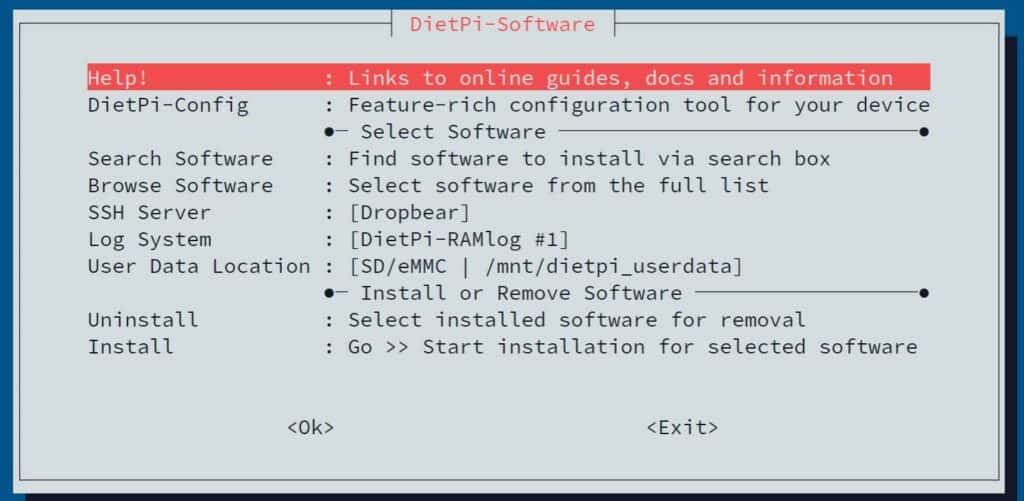
dietpi is another thing ive used on a few devices, mainly small SBCs and raspberry pi's, but i think they might have a version that you can install on anything. its basically just debian, and it has a sort of a wizard that helps set up various things like set up disks and install apps. its headless though so no GUI unless you install one, and the wizard is run from the terminal but youre not having to type any commands at least
I'm not trying to be unhelpful. My advice would be to steer into the terminal. Bite the bullet. I use arch and alpine for my servers but Fedora would be fine (but SELinux can be a pain with bund mounts)
Probably just go with Fedora with btrfs for snaps. It has lots of support and is a common choice for servers
load more comments
(4 replies)
Not that I'm using them, but what about these two?
https://hexos.com/ is also trying to be a low skill low effort version of truenas, but it does have a one time payment. I didn't think you'd need a nas specific OS for just one storage laptop though, it's more meant for large home storage servers.
load more comments
(1 replies)
(I’m not very good with the command line)
Me either so I take a lot of notes about commands and command sequences. Also, I find that Grok is pretty decent at explaining commands. AI is a wonderful tool, but you also need to do your due diligence in ascertaining whether AI has given you the correct information. I would not copy/paste random commands into a production server, but rather I have a small test server for that kind of stuff. Once I have the command, tested, and understand the command, I can then use that in a production environment.
In as much as I love a good WUI, you will have to learn some cli, it's just inevitable, especially in a headless environment. It may seem daunting at first because there are literally thousands of commands and command sequences. I honestly doubt if even the geekiest nerds on the planet know all by heart. For each command sequence, there are probably hundreds of ways to compose the same command. I would admonish you to download Notepad ++ and start keeping notes on the commands you use. Later on, the fun part is looking back on your notes to see all the commands you now know and what they do.
Core utilities (like ls, cd, cat, etc.) from projects like GNU Coreutils provide around 100-200 commands. Additional tools from packages (e.g., grep, awk, sed) and system utilities (e.g., systemctl, iptables) can add hundreds more. On a system with many packages installed, running compgen -c | sort -u | wc -l in a Bash shell might show 2,000–10,000+ unique commands, depending on the setup.
load more comments
(1 replies)
FWIW I've been using Ubuntu desktop with CasaOS for a couple of months now to host Nextcloud, Jellfin, Immich and a few other bits and bobs with absolutely no issues at all so far!
I went with Truenas Scale and was pleasantly surprised it needed no command line kung fu
load more comments
(3 replies)