Tiny Core
post
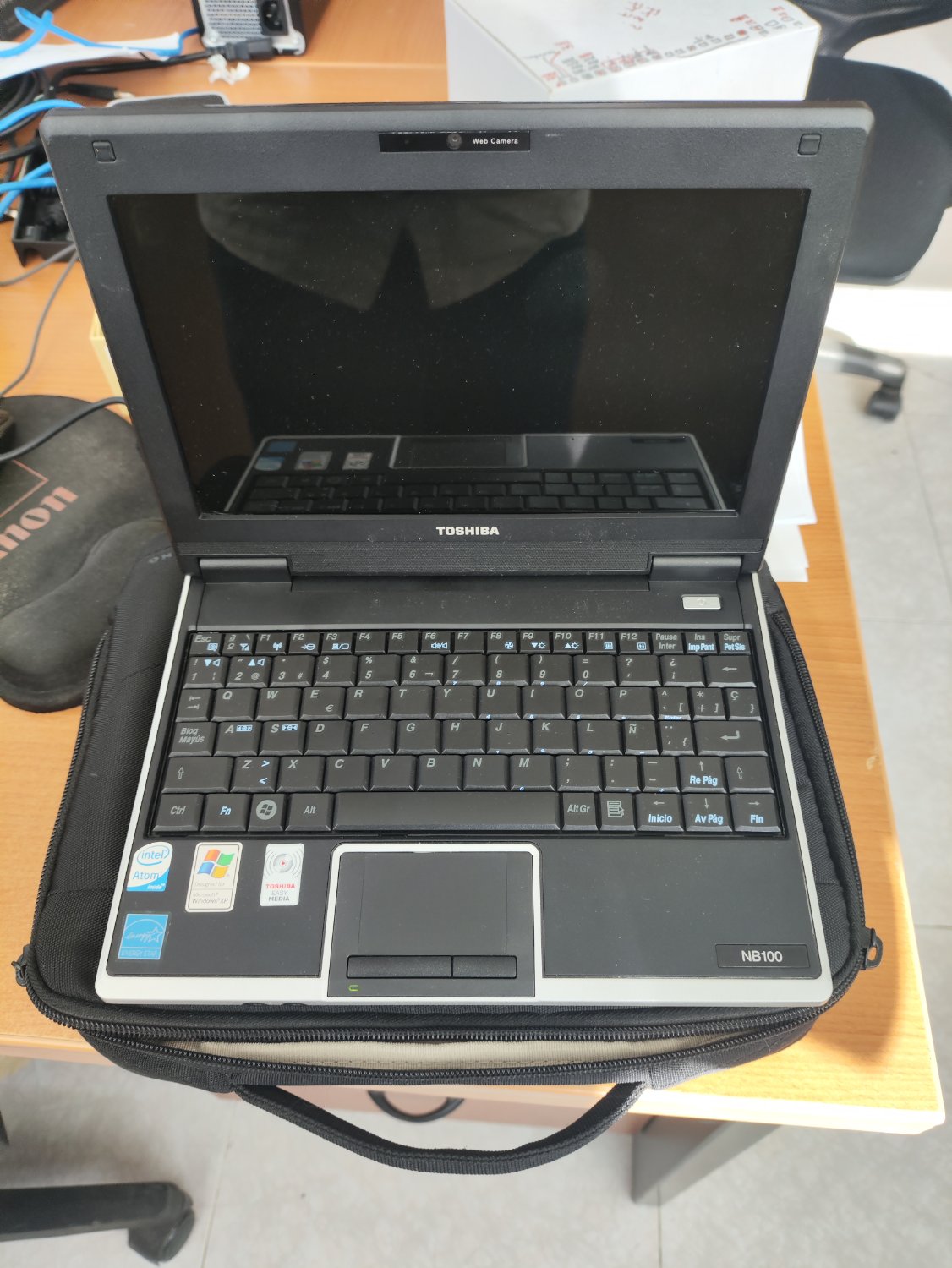
It's a 32-bit CPU afaik. Sadly Debian Trixie doesn't support 32-bit anymore. Old stable Debian Bookworm would be a good option.
Maybe SliTaz? https://www.slitaz.org/en/
Arch Linux 32-bit? https://archlinux32.org/
TinyCore (loads itself into RAM), Puppy, Proteus and Zolin Lite will all be happy with 512 MiB.
Edit: also antiX, QOS, Slax and DSL.
Archbang, Slitaz, Sparky and MX may not support x86, double-check.
Also gentoo has a full binary-only version now.
Edit2:
Interesting that Zorin says their regular flavors are now efficient enough that they'll run just fine on older hardware, so there's no need to continue Zorin Lite:
It’s now possible to run the non-Lite editions of Zorin OS on computers with as little as 2 GB of RAM and on machines as old as 15 years, with higher performance than the Lite edition in some tasks.
Emphasis mine. Wow, only 2 GiB...
I'm gonna anti-recommend TinyCore unless you're an advanced user. The wiki is a trap full of outdated info spread across several different versions of the OS.
Emphasis mine. Wow, only 2 GiB...
That's not as low as you'd think, to be fair. I've tried to run Kubuntu on a 10 year old laptop with 2 GiB RAM and it worked, if only a little laggy. That being said, it crashes after half an hour without swap. But with swap, it is legitimately daily drivable (as long as you don't run heavy apps, of course).
I'd imagine a distro that's designed to be even more lightweight would be able to handle that.
I recommend Puppy for the cutest distro! As long as you don't need/expect everything to work 100%
MX Linux.
It can run in in pretty much all hardware, and it's debian-based too!
It has Libreoffice, Firefox, etc. by default.
Heck; if you can't install it, you can just use is persistently from the USB!
MX Linux, AntiX, Puppy Linux?
RAM will be an issue if they want a Desktop Environment. It would be good to find out max RAM that machine supported and purchase a replacement stick.
If you can get at least 2gig you might have an OK platform.
If you can't increase RAM then there is a cool project called HaikuOS that is super lightweight, they have some popular packages for it, butitd is not a Linux distro with tons of availabe apps. Its got a late 90s feel to it.
One thing you could try is Alpine Linux It is surprisingly lightweight, and pair it with something like OpenBox or maybe XFCE, and it might be quite good
Cute!!
Have you considered freeDOS? Would run rral snappy on there. Im doing that with my p3 64mb ram gateway.
512MB of Ram
Arch does technically „„run”” on it™
Otherwise regarding the CPU, I would set up a gentoo with distcc on it, since you dont be daily driving the thing anyways
Just installed MiniOS on my 15 year old Dell Ultrabook. Small, fast and light.
I wanted to say tiny Core, but someone gave that. So I'll give another suggestion. Use something XFCE based or LXQt based. Maybe mint in XFCE De is the way to go if you want a feature rich solution that is light on resources.
512MB of ram? you could probably just run a command line terminal and call it a day. good luck, soldier. bringing that old warhorse back to life is a noble quest.
There was recently another user asking the same for a similar machine on the .ml Linux comm.
As I did there, I can only tell you I successfully ran antix on a similarly old eee-pc from 2007ish, with the same CPU. It did have 1gb of ram though iirc, but the distro ran fairly comfortably (until it came to browsing with many tabs open).
I would usually recommend Linux Mint, but damn that thing belongs in a museum!
Hell, why not put an antique OS like Windows XP for that antique piece of beauty?
It's running windows XP but it's currently unable to use any browsers as the user wants to use it for
There are workarounds but i'd discourage you from trying.
Go linux,
I'm afraid you're really shit outta luck as even Firefox is killing 32-bit.
You could prolly find someone who's kept some old versions of 32-bit FF, but using them on -today's- network with old-time security? Whoof. As for the OS, some older XFCE's WILL work OK w 500MB, but you'll be waiting on disk-swap a lot, and SSD options will be limited.
but using them on -today's- network with old-time security?
This has always been the main issue with older software, hasn't it?
Lots of good options already given, to throw a couple more one the pile Slackware if you want to play around with Linux more for a hobbyist than a user, Tails for a small Debian based security focused distro, or FreeBSD for something completely different but familiar, I've installed that on some pretty tiny hardware and it ran fine including an x86/atom CPU.
I don’t know for the other but tails doesn’t exist as a 32bit version, does it? I’m also not sure it would very comfortable on 512mb ram.
Yep that's my bad, looks like that's some old info I should have checked on. Tails dropped 32 bit x86 support in 2017 & wants more memory. A month ago freeBSD released a beta for 15.0 dropping support which is a bigger bummer for me since I like that OS for old hardware. Slackware still supports 32 and 64 bit architectures.
Are the BSDs generally good/workable on older hardware, especially laptops? I don’t really have a clue (no knowledge beyond Linux) but if so it sounds like a nice use for an old laptop, as a learning tool.
That's going to run like garbage with any desktop environment.
You need a lightweight window manager.
top 50 comments