1
submitted 10 months ago* (last edited 10 months ago) by to c/bazzite@lemmy.world


I get the following error message:

amd_pstate: failed to register with return -19

And there's more but then the screen turns into a creepy pasta gif looking thing of white and green shifting blocks, except for a few random letters.

But the issue doesn't happen when I used a Garuda xfce I had laying around I used for an older PC (that was maybe too old for Bazzite?). That went into the installer and live iso environment without issues.

It's a newish build I'm making for someone as a gift with the following hardware:

Asus Prime B550M-K AM4 microATX Kingston FURY Beast DDR4 3600 MHz AMD Ryzen 5 4500 AM4

And a used Nvidia RTX 3060ti.

I have secure boot off I think (the Asus EZ bios is weird)

Update

I managed to install it using the text installer, but now it does this:

Then blank screen. Ctrl-Alt-F2 gives me a terminal at least and I did just get-logs which gives me the following:

Is this a Wayland issue?

Update 2:

Not a Wayland issue. But tried installing Fedora Kiinoite to rebase it to Bazzite, but Fedora has the same issue Bazzite did when trying to install, only it doesn't mention the Elf 19 error, and it frezzes allowing me to take a picture:

I really love Bazzite and run it on my own computer, but I'm starting to think it doesn't really run on older desktop hardware.

Update 3: Updating Bios didn't work...

2
submitted 10 months ago* (last edited 10 months ago) by to c/bazzite@lemmy.world


Hey everyone, did anyone notice that bazzite-nvidia downgraded it's Nvidia driver with the recent update?

I updated from build 20251118 to 20251126 and noticed that Nvidia drivers for downgraded from 580.105.08 to 580.95.05 in the process.

I only found out because suddenly a game I play stopped working after the bazzite update.

Edit: Opened an issue on GitHub: https://github.com/ublue-os/bazzite/issues/3562

3
submitted 10 months ago* (last edited 10 months ago) by to c/bazzite@lemmy.world


Hey everyone, I’ve got Bazzite installed on my laptop and everything is working great so far. The only issue I’m running into is that the brightness function keys (increase/decrease screen brightness) aren’t doing anything.

Has anyone dealt with this? Any tips on how to properly configure or remap the brightness keys under Bazzite? I don't really know where to start and searching for info hasn't provided anything useful.

Thanks!

EDIT: the laptop is a Lenovo Ideapad 330-15ICH

4
submitted 10 months ago* (last edited 10 months ago) by to c/bazzite@lemmy.world


Trying to mount my gfs iPhone to her PC, tried KDE getting an error when trying to open files, what's the EASIEST way to just plug this damn thing in so she can transfer some photos, I'm too drunk for this shit

5


First, some technical details out of the way:

  • OS: Bazzite, should be latest version.
  • CPU: Ryzen 5600x
  • GPU: Intel Arc A770 16 GB
  • RAM: 32 GB DDR 4
  • MESA: 25.2.7

When attempting to launch an Unreal Engine game with Proton version above 9.0-4, or Proton Experimental, or above GE-Proton 10-1 I get this crash and error:

!status && "vkQueuePresentKHR"

I've searched for this error and only found some old threads pointing to Steam Overlay being a problem. However, disabling Steam Overlay does not stop this issue.

Some of the UE games I play function on lower versions of Proton, others refuse to launch at all.

What could be causing this issue? What would I do to fix it?

6


I installed bazzite to replace windows 10 and really liking it so far. I haven't experienced anything major issues wise, and it's working nice with my rtx 2070 for everything I've tried in Steam so far.

The only issue I have now is per the title. I have the PC connected via HDMI to an AV receiver and then to the TV. If I boot the PC without the TV on and input set to PC, the display doesn't trigger when I switch to it afterwards, even if I wiggle the mouse or whatever. It only works if the monitor is ready and waiting before I boot.

Any clues? I am very new to Linux, haven't used it in ages and then not intensively.

7


I tried installing Stellaris earlier today through my attached GOG account (I would use Heroic, but Heroic has issues with the Stellaris launcher that still haven't been fixed, and I need the launcher), Got as far as "extracting stellaris.sh", and then stopped.

Opened up Lutris with terminal and noticed that it was hanging with a repeating error. Can't find wine, can't open virtual terminal.

Read somewhere that reinstalling Lutris with flatpak would fix that issue. Was pretty sure Lutris would already be a flatpak, since it comes with Bazzite, except...

Bazaar doesn't recognise Lutris. Doesn't show up on my list of installed flatpaks either. RPM doesn't recognise it either. So I can't remove Lutris. And what's more; there doesn't seem to be a flatpak of Lutris available through Bazaar.

What now?

8
 
 
9


Hey,

I've been using Bazzite for the most time of the year and I am having some stability issues that seem to be connected to KDE Plasma.

On the one hand side KDEs "start menu" (what's it called anyway when not on Windows?) stops working from time to time and doesn't open on click. On the other hand side Plasma Shell occasionally doesn't start correctly resulting in no desktop whatsoever (I can open a terminal with Alt+F2 though) and forcing me to reboot (it may be enough to systemctl restart --user plasma-plasmashell.service but I didn't try this yet)

Long story short: I thought I'd do some trial and error and use Gnome for some time. Turns out switching Desktop Environments on a whim is not compatible with Bazzites immutable design philosophy...

Do you have any ideas apart from completely re-installing?

10


Hey gang, I've been wanting to pretty up my desktop environment but I can't seem to find anything about using themes for GNOME and I can't get tweaks to install. Anyone have suggestions?

11
12
submitted 11 months ago by to c/bazzite@lemmy.world


Giving bazzite a test run before deciding to jump ship from windows. Seems great so far but I'm currently hitting a wall. I'm trying to play Liftoff, which requires a drone controller to be plugged in. In order to grant usb privileges (serial port I think), I need to install BETAFPV configurator. That's a deb package so I set up a mint container in distrobox and installed, changed permissions, and exported it. When trying to launch in command line, it says libnss3.so doesn't exist. I downloaded a deb for that library and installed it on the mint container as well, but am still getting the same error.

About to try the windows installer with wine but if anyone can tell me why I'm dumb, that would be fantastic.

13
submitted 1 year ago* (last edited 1 year ago) by to c/bazzite@lemmy.world


cross-posted from: https://lemmy.world/post/36521347

Nexus Gamers are going to test gpus on Linux (Bazzite)

https://m.youtube.com/watch?v=5O6tQYJSEMw

14
 
 
15
 
 
16
One more (discuss.tchncs.de)


I convinced my teenage son to install bazzite on his gaming laptop to avoid Windows 11 and he likes it!

The best part: he wanted some game and worked his way through using Wine and Bottle to make it work, all by himself. He told me he feels "a bit like a hacker" now.

Can't tell you how proud this made me.

17


Hello I recently got bazzite up and running again and am ready to start editing some photos I took while I was down.

last time I just installed rapid photo downloader using rpm-ostree but I remember reading that it is recommended to install applications using distrobox.

I launched distroshelf and installed ubuntu 22.04 and followed the instructions from the rapid photo downloader website https://damonlynch.net/rapid/download.html
adding the repository and sudo apt install rapid-photo-downloader

now when I try to launch it I get some errors as its trying to start then it just closes.
Im not really sure what to do with this info, any help is greatly appreciated

spoiler

rapid-photo-downloader 
qt.qpa.plugin: Could not find the Qt platform plugin "wayland" in ""
amdgpu: unknown (family_id, chip_external_rev): (150, 193)
libGL error: glx: failed to create dri3 screen
libGL error: failed to load driver: radeonsi
ERROR: An unhandled exception occurred
ERROR: Traceback (most recent call last):
  File "/usr/lib/python3/dist-packages/raphodo/storage/storage.py", line 1145, in startMonitor
    self.udisks = UDisks.Client.new_sync(None)
gi.repository.GLib.GError: g-io-error-quark: Could not connect: No such file or directory (1)

qt.qpa.plugin: Could not find the Qt platform plugin "wayland" in ""
QBackingStore::endPaint() called with active painter; did you forget to destroy it or call QPainter::end() on it?
Fatal Python error: Segmentation fault

Thread 0x00007f306e7fc640 (most recent call first):
  File "/usr/lib/python3/dist-packages/zmq/sugar/poll.py", line 105 in poll
  File "/usr/lib/python3/dist-packages/raphodo/interprocess.py", line 318 in run_sink

Thread 0x00007f306effd640 (most recent call first):
  File "/usr/lib/python3/dist-packages/zmq/sugar/poll.py", line 105 in poll
  File "/usr/lib/python3/dist-packages/raphodo/interprocess.py", line 318 in run_sink

Thread 0x00007f306f7fe640 (most recent call first):
  File "/usr/lib/python3/dist-packages/zmq/sugar/poll.py", line 105 in poll
  File "/usr/lib/python3/dist-packages/raphodo/interprocess.py", line 318 in run_sink

Thread 0x00007f306ffff640 (most recent call first):
  File "/usr/lib/python3/dist-packages/zmq/sugar/poll.py", line 105 in poll
  File "/usr/lib/python3/dist-packages/raphodo/interprocess.py", line 318 in run_sink

Current thread 0x00007f308d7fa640 (most recent call first):
  File "/usr/lib/python3/dist-packages/raphodo/excepthook.py", line 206 in excepthook

Thread 0x00007f308cff9640 (most recent call first):
  File "/usr/lib/python3/dist-packages/zmq/sugar/poll.py", line 105 in poll
  File "/usr/lib/python3/dist-packages/raphodo/interprocess.py", line 318 in run_sink

Thread 0x00007f308effd640 (most recent call first):
  File "/usr/lib/python3/dist-packages/zmq/sugar/socket.py", line 625 in recv_multipart
  File "/usr/lib/python3/dist-packages/raphodo/interprocess.py", line 687 in start_load_balancer

Thread 0x00007f308f7fe640 (most recent call first):
  File "/usr/lib/python3/dist-packages/zmq/sugar/poll.py", line 105 in poll
  File "/usr/lib/python3/dist-packages/raphodo/interprocess.py", line 318 in run_sink

Thread 0x00007f308ffff640 (most recent call first):
  File "/usr/lib/python3/dist-packages/zmq/sugar/poll.py", line 105 in poll
  File "/usr/lib/python3/dist-packages/raphodo/interprocess.py", line 318 in run_sink

Thread 0x00007f309c80c640 (most recent call first):
  File "/usr/lib/python3/dist-packages/zmq/sugar/poll.py", line 105 in poll
  File "/usr/lib/python3/dist-packages/raphodo/interprocess.py", line 1224 in startReceiver

Thread 0x00007f30c0871000 (most recent call first):
  File "/usr/lib/python3/dist-packages/raphodo/rapid.py", line 7475 in main
  File "/usr/bin/rapid-photo-downloader", line 33 in <module>

Extension modules: PyQt5.QtCore, gi._gi, psutil._psutil_linux, psutil._psutil_posix, zmq.backend.cython.constants, zmq.backend.cython.error, zmq.backend.cython.message, zmq.backend.cython.context, zmq.backend.cython.socket, zmq.backend.cython.utils, zmq.backend.cython._poll, zmq.backend.cython._version, zmq.backend.cython._device, zmq.backend.cython._proxy_steerable, PyQt5.QtGui, PyQt5.QtWidgets, gphoto2._widget, gphoto2._version, gphoto2._result, gphoto2._port_log, gphoto2._port_info_list, gphoto2._list, gphoto2._filesys, gphoto2._file, gphoto2._context, gphoto2._camera, gphoto2._abilities_list, tornado.speedups, PyQt5.QtNetwork, PyQt5.QtDBus, PyQt5.QtDesigner, PyQt5.QtHelp, PyQt5.QtPrintSupport, PyQt5.QtTest, PyQt5.QtXml, PIL._imaging (total: 36)
Segmentation fault (core dumped)

18


cross-posted from: https://lemmy.ml/post/35042732

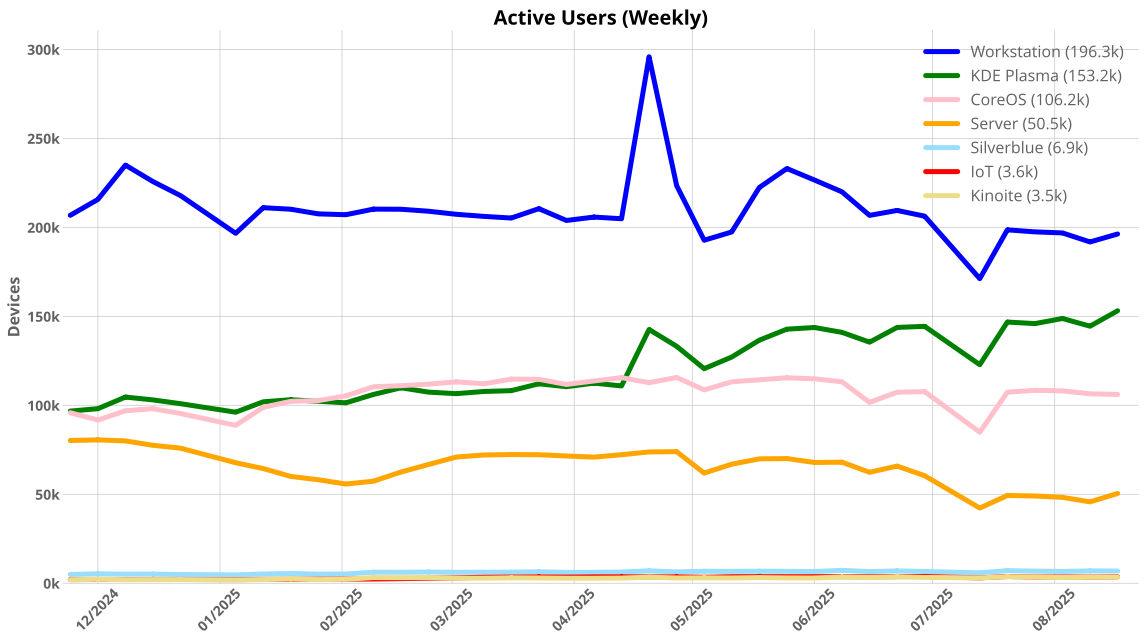
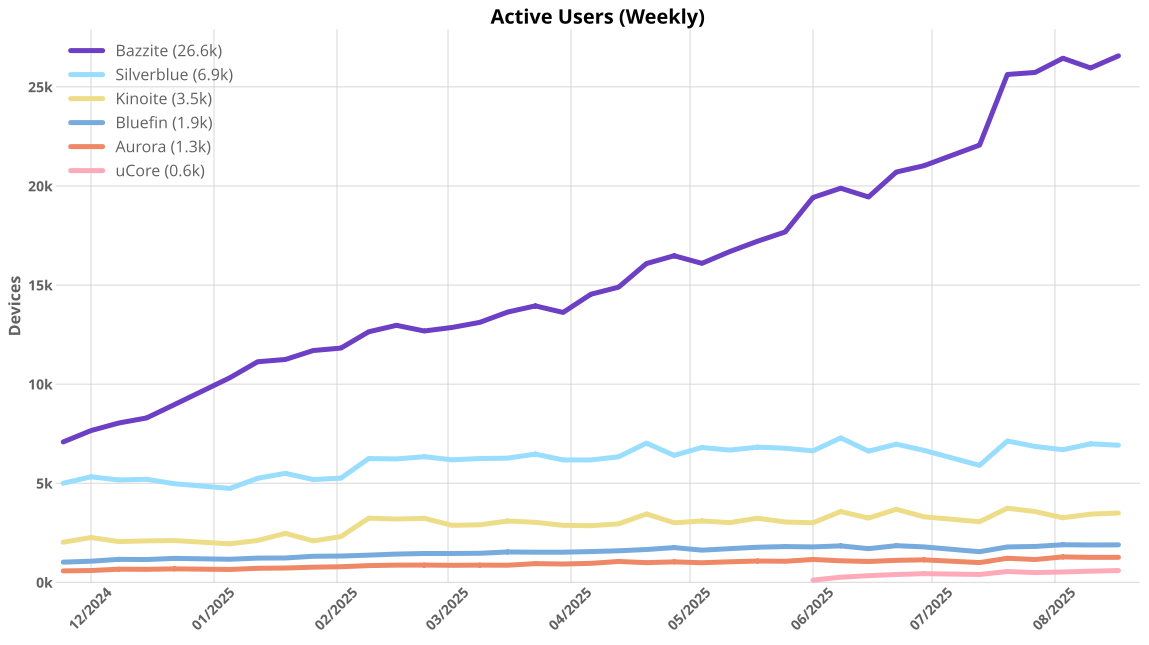
Generated via https://github.com/ublue-os/countme

10k added users since last post. Here are upstream Fedora numbers only

19


I was managing two external hard drives and the files app froze, asking me if I wanted to force close or wait.

After closing, the screen went black and I had to restart it.

Is this normal? I don't know if it gets overloaded with many desktop apps like QBittorrent and Brave Browser.

20
21


Hi all, big fan of Bazzite and have it installed on several of my devices.

I just picked up a new (to me) laptop. This laptop has an 8845HS APU w/ 780M iGPU and also a NVDA 3050 6GB dGPU.

Using this laptop in desktop mode works perfectly fine. However, I reallllly want to use gaming mode, which, upon initial installation works just fine, but after reboot it opens to a black screen.

Now the Bazzite website says:

Some devices with two AMD GPUs (iGPU and dGPU) cause gamescope to be unable to detect your display resulting in a black screen. If you are affected, use an image without Steam Gaming Mode or disable your iGPU.

Obviously neither of those suggestions are ideal...

I assume this also applies to AMD iGPU + NVDA dGPU.

However the issue they link to in the above message pertains to several Framework 16 users. And if you select the Framework version of Bazzite, you get this message:

Enjoy enhanced dGPU support on the Framework 16…Applications like Steam and Lutris are automatically configured to run on your dGPU for optimal performance…Be sure to select Steam Gaming Mode for the ultimate console-like gaming experience

Implying that there's no problem with hybrid GPUs? So is there a fix somewhere they're not pushing to other versions? Or is this a hardware issue I'll never be able to overcome? Should I try and install the Framework version?

I posted this on the Bazzite Discourse forum but honestly it seems dead as hell over there.

Currently I'm using Nobara and using NVDA on desktop and AMD in Game Mode but that's obviously not ideal and Nobara doesn't ship with Game Mode + GNOME and honestly I really don't like KDE. 😬

22


Legitimately stoked I finally got #Titanfall2 running on @bazzite WITH #Northstar

Hell yeah. It’s literally the best #multiplayer game that’s still playable. Now let’s hope that the #RELB project keeps up momentum and #Lawbreakers is finally playable on Linux

That, or #Ubisoft WISES UP AND ALLOWS LINUX TO RUN #RAINBOW6 SIEGE. DAGGUM YOU GUYS ARE DENSE

23
24


I have a strange bug on my Steam Deck with OpenSUSE Tumbleweed and I would like to know if it happens on other handhelds/distributions as well.

In Plasma Wayland 6.4 fullscreen windows shift up about half a screen when using gamepad input. They become normal again when I use mouse input. Happens with games as well as in VLC.

Edit: Can't take a screenshot of it, so here's a photo:

25


Just FYI, I've been having issues where Bazzite won't wake up from sleep and this fix I found on the reddit Bazzite community seems to at least make things a lot better.

In the terminal run

rpm-ostree kargs --append-if-missing='acpi_osi=!Windows 2015'

view more: next ›